
The digital education report
On the official SDBB form, filled in and signed electronically. It draws on what was documented over the semester anyway.
The education report is the semi-annual review between the training company and the learner. Twice a year you record how the learner has developed professionally and personally, and agree on the goals for the next semester. It is discussed in the appraisal meeting and signed by both sides.
Digital here does not mean that a PDF goes out by email at the end. The report is filled in in the browser, step by step through the real form, and signed electronically. The evidence from the semester sits right next to it instead of being gathered up.
How often, and who signs
At the end of each semester, so twice a year. The training company records how the learner has developed professionally and personally, and agrees on the goals for the next semester. In practice the official SDBB form is used for this. It is signed by the vocational trainer and the learner; for learners under 18 the parents confirm as well.
SDBB is the Swiss Services Centre for Vocational Education and Training. It publishes the form used across Swiss vocational education.
Sources: Example Computer Science VET: SERI ordinance of 19 November 2020, SR 412.101.220.10, Art. 13 · SDBB, berufsbildung.ch: the education report and the learning documentation (German)
What digital actually means here
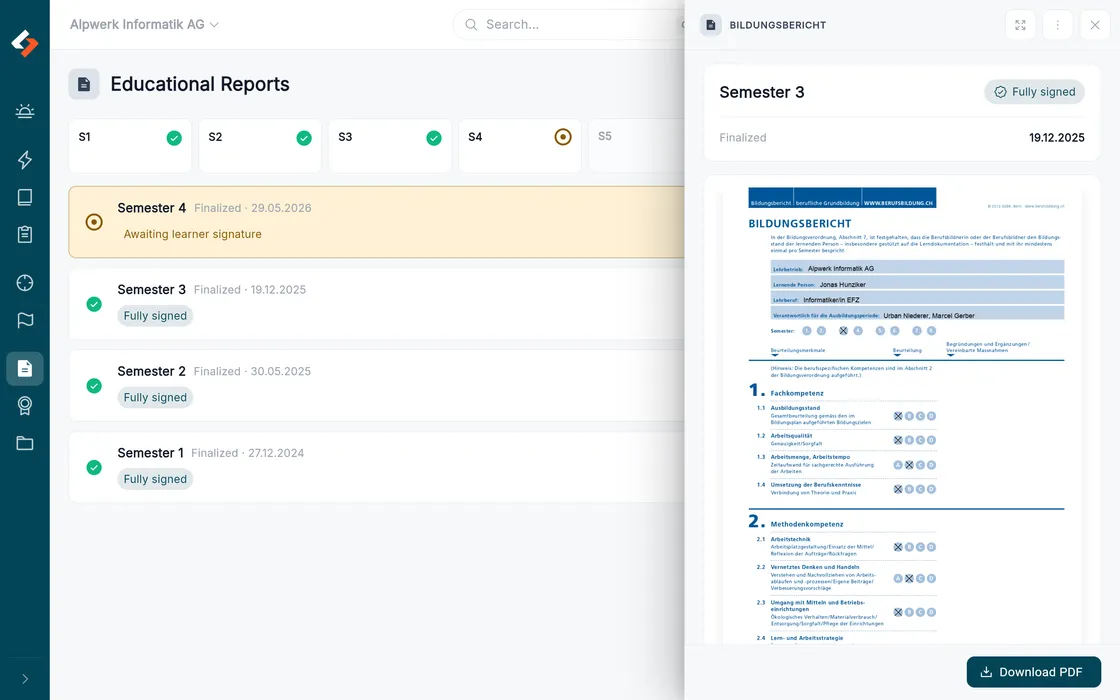
The real form
mentro fills the official SDBB form as a PDF. Not a lookalike and not a layout of our own that somebody has to accept first.
Filled in in the browser
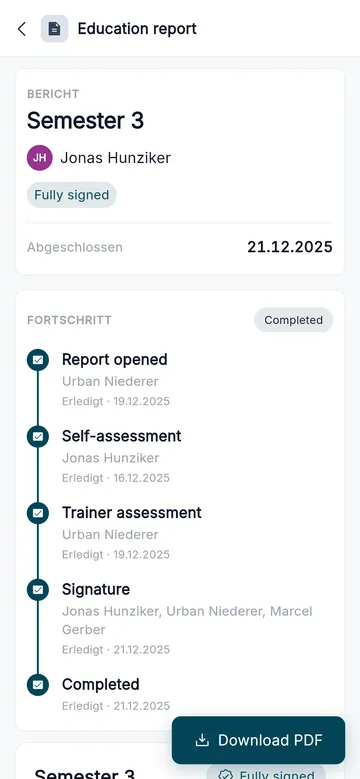
Step by step through every section, with your progress saved. You do not have to finish the report in one sitting.
Signed electronically
Company and learner sign electronically. For learners under 18 the parents confirm via a secure link.
Unchangeable afterwards
A digital fingerprint shows that the report has not been altered since it was signed.
You write the assessment, the evidence sits beside it
mentro does not word your assessment. While you write, it lays out what came together over the semester: activities, journals, observations and reviews for the competency at hand.
- The learner’s self-assessment visible while you fill it in
- Evidence from activities, journals and observations
- Your observations per section of the form, not as one long list
- Finished PDF to download, file and print
The sections of the form
mentro takes you through the sections of the official form, in the same order as they appear there:
- Professional, methodological, social and personal competence
- State of the learning documentation
- Vocational school and inter-company courses
- Goals reached since the last report
- Goals and measures for the next semester
Where the evidence comes from
mentro brings together evidence from six sources: activities, learning journals, observations, practical assignments, earlier education reports and grades. Every record is weighted by how reliable it is, and an observation from you counts considerably more than a self-assessment.
Activities and learning journals
What the learner recorded and reflected on day by day, mapped to the operational competences.
Observations
What you noted down in everyday work. The strongest evidence in the competency picture.
Practical assignments
Assignments you set and graded, with your grading as evidence.
Grades and earlier reports
School grades per area and semester, plus the goals reached since the last report.
Common questions about the education report
Read on
Nothing to reconstruct at the end of the semester
Request a test environment and look at the report on the real form, with the evidence beside it.